

Building an AI-Powered Analytics Interface: A Practical Journey Through Our BFF Architecture
How we designed a Backend-for-Frontend layer that keeps the frontend blissfully unaware of backend complexity

Introduction
When we set out to build an AI-powered interface for our analytics platform, we faced a challenge that will feel familiar to many engineering teams. We needed to integrate complex backend logic with a clean, responsive frontend without turning the system into what the software engineering community calls a “Big Ball of Mud” - a haphazardly structured system where everything depends on everything else and changes in one place ripple unpredictably throughout the codebase.
Our solution was a Backend-for-Frontend (BFF) layer. This service sits between our React frontend and the wider backend ecosystem. However, it is not a simple proxy. The BFF acts as a deliberate abstraction layer. The frontend does not understand domain concepts such as what a metric is, how date range formulas work, or how action payloads are constructed. It simply renders what it receives.
In this article, we walk through the practical architectural decisions we made and explain why this approach worked so well for us.
Our Architecture: From LLM to UI
To understand the role of the BFF, it helps to look at the full system architecture. Our AI-powered analytics interface consists of five clearly separated layers, each with a single responsibility.
Agentic Service
The Agentic Service is our Agentic System. It manages conversations with the language model, coordinates tool calls, and drives the AI’s reasoning process. When a user asks a question such as “Show me my website traffic for the last 30 days,” this service interprets the intent, determines which metrics are required, and constructs the visualization payload. It then communicates with the backend framework through a well-defined protocol.
Backend
The backend acts as the system’s central nervous system. It handles authentication, manages user sessions, stores conversation history, and routes messages between services. When the Agentic Service produces chart data or other AI responses, the framework broadcasts them over Pusher channels. It does not concern itself with presentation details. Its only responsibility is to deliver data reliably to the correct destination.
AI BFF (Backend-for-Frontend)
The AI BFF is the translation layer and the primary focus of this article. It subscribes to Pusher channels exposed by the backend, transforms raw payloads into UI-ready structures, and publishes them to frontend-specific channels. It also exposes REST endpoints for actions such as fetching available date ranges or saving a metric. The BFF is the only layer that understands both backend domain structures and frontend rendering requirements.
AI Package
The AI Package is our React component library. It contains chart components, compound components such as AttachmentCard, action providers, and all UI-related logic. Crucially, it contains no business logic. It does not calculate date ranges, determine available actions, or transform backend data. It receives pre-processed payloads and renders them.
Webapp
The Webapp is our main Ember.js application, which hosts the AI Package. It serves as the integration layer. It handles navigation, coordinates with other parts of the product, and executes actions when users interact with the UI, such as clicking “Add to Dashboard.” React components are embedded inside the Ember application and communicate with it through a strict callback interface.

The Starting Point: What Does a Chart Actually Need?
Everything began with a deceptively simple question. What is the minimum amount of data required to render a chart?
We use Highcharts for visualization. At its core, Highcharts requires very little information:
// This is essentially all Highcharts needs
{
  series: [
    { data: [[x1, y1], [x2, y2], [x3, y3]] }
  ]
}
This is essentially just a list of x/y coordinate pairs. A chart can contain multiple such series.
However, our real-world requirements quickly went beyond simple line charts. Tooltips needed to show comparison values from previous periods. Summary statistics required both current and comparison values. The chart header needed a title and a dynamic icon based on the data source.
Instead of pushing this complexity into the frontend, we made a clear decision. The BFF would compute everything, and the frontend would only render the result.
We also intentionally designed our payloads to be library-agnostic. Although we use Highcharts today, the BFF does not return Highcharts-specific configuration objects. Instead, it returns generic metadata such as series data, comparison values, labels, and additional properties. The React layer maps this metadata to Highcharts internally.
This decoupling is deliberate. If we decide to switch to a different charting library tomorrow, such as Apache ECharts or Recharts, only the mapping layer in the frontend needs to change. The BFF, data flow, and action system remain untouched. The same structure also allows us to extend metadata freely as new requirements emerge without coupling ourselves to a specific visualization API.
The BFF’s Core Philosophy: Frontend Ignorance
Our most important architectural decision was to keep the frontend intentionally ignorant of business logic. The frontend should not know how date ranges are calculated, which actions are available for a given metric, how metric setups differ between operations, or what granularity should be used for a specific time span.
All domain logic lives in the BFF. This strict separation follows the principle of Separation of Concerns. The frontend focuses on rendering and user interaction. The BFF focuses on business rules and data transformation.
This philosophy becomes particularly clear when we look at date ranges and actions.
Date Ranges: Keep It Simple
On the backend, our date range system is sophisticated. It supports relative ranges such as “Last 30 days,” comparison periods like “vs. previous period,” and automatic granularity selection based on the time span. Short ranges might use daily data points, while longer ranges switch to weekly or monthly aggregation. The algorithm balances data density, visual clarity, and performance.
The frontend does not need to understand any of this.
When a user selects a date range, the BFF sends only minimal metadata. This metadata is sufficient for the UI to display the selection and later convert it back into the backend’s full date range formula:
type SimpleDateRange = {
  rangeTypeId: RangeTypeId;             // e.g., “LAST_X_DAYS”
  granulationTypeId: GranulationTypeId; // e.g., “DAY”
  multiplier?: number;                  // For “Last X days”
  startDate?: string;                   // Only for custom ranges
  endDate?: string;
};
The frontend receives a list of available presets that are already filtered and prepared by the BFF. It does not calculate anything. It simply renders the options.
Actions: The Frontend Renders, The BFF Decides
Actions are where this architecture truly shines. Charts can expose contextual actions such as “Add to Dashboard,” “Set Goal,” or “Open Insights.” The React components never decide which actions are available. They ask the BFF, render what they receive, and delegate execution upward.
BFF: The Decision Maker

When the frontend renders an attachment, it sends a request to the /available-actions endpoint with the attachment type and payload. The BFF’s AvailableActionsService receives this request and delegates it to an AvailableActionFactory.
The AvailableActionFactory uses a factory-based approach to instantiate a specialized factory based on the attachment type (e.g. CHART or IFRAME).
The result is an array of action objects. Each action includes a type identifier, a fully prepared payload, and a flag that indicates whether the action should appear as a primary button or inside a menu.
This design is highly extensible. Supporting a new attachment type requires creating a new factory and adding a single case. Existing code does not change, which aligns with the Open/Closed Principle.
React: The Renderer
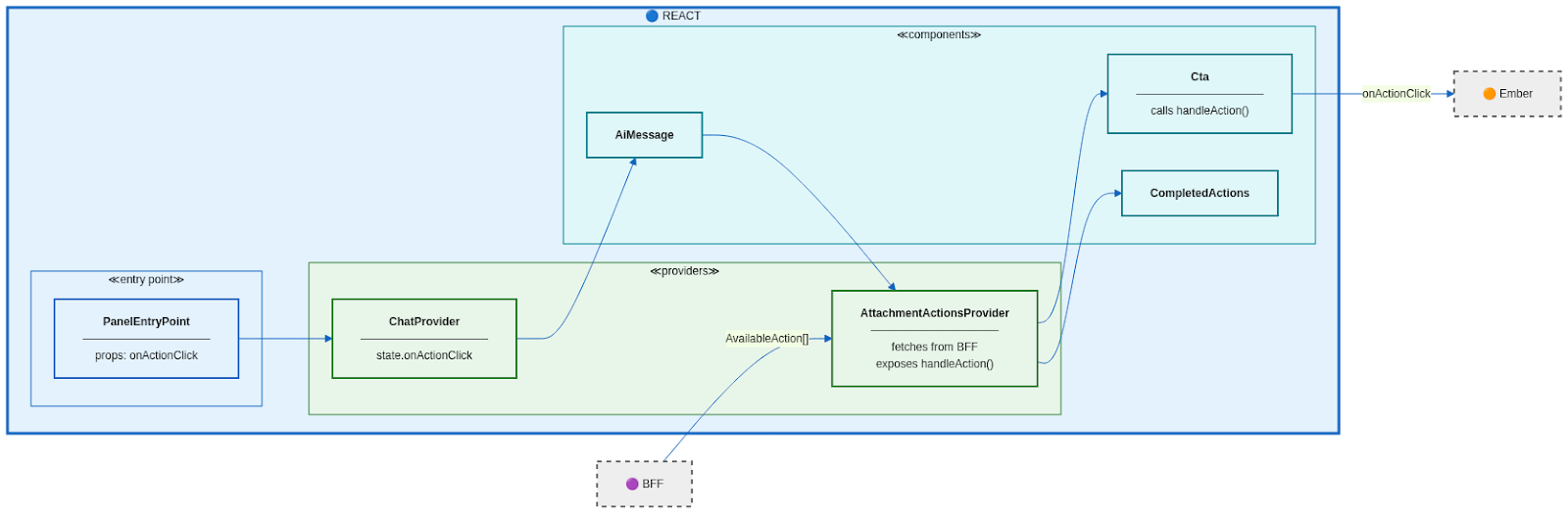
The React layer is intentionally minimal. It renders actions without understanding their meaning.
At the top level, the React entry point receives an onActionClick callback from the Ember application. This callback is stored in context using the Provider Pattern so that it is available throughout the component tree.
When an attachment is rendered, an AttachmentActionsProvider fetches available actions from the BFF, splits them into primary and menu actions, and exposes a handleAction function. UI components simply call this function when clicked.
This is Inversion of Control in practice. Components do not control behavior. They delegate it.
Ember: The Executor
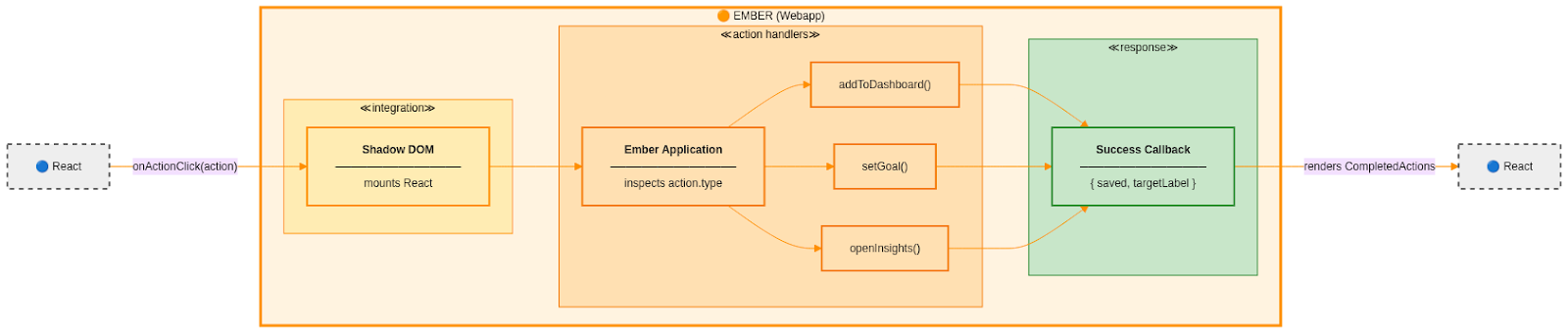
The Ember application is the only layer that executes actions. It knows how to open dialogs, save data, navigate between routes, and coordinate application-wide behavior.
When React triggers an action, the callback crosses the boundary into Ember. Ember inspects the action type and executes the appropriate handler. Once the action completes, Ember returns a result object that the React layer can display as feedback.
Completed Actions: Stacking Success Messages
Successful actions generate confirmation messages that appear below the attachment. These messages stack as users perform multiple actions. Each confirmation can contain links that trigger further actions, creating a recursive and composable interaction model.
The frontend does not interpret these results. It only renders them and forwards user interactions back through the same callback mechanism.
Real-Time Communication: The Pusher Architecture
Our AI chat interface streams responses in real time. We use Pusher WebSockets, with the BFF acting as both a client and a server.
The backend sends raw AI responses. The BFF subscribes to these channels, transforms the payloads using factories, ensures correct ordering, and publishes frontend-ready events to separate channels. This design allows backend and frontend teams to evolve independently, with the BFF absorbing structural changes.

Ordered Delivery
To guarantee message order, we implemented a per-thread queue. Events are grouped by conversation and processed sequentially. This ensures a consistent streaming experience while still allowing parallel processing across multiple users.
Graceful Shutdown
During deployments, the BFF handles shutdown gracefully. Instead of dropping connections, it broadcasts a reauthentication event to connected clients. The frontend reconnects automatically, resulting in a brief reconnection rather than a broken chat experience.
Bandwidth Optimization with Compression
We also support compressed events. The BFF transparently decompresses incoming data, applies transformations, and recompresses it before forwarding. The frontend handles decompression without any awareness that compression is involved.
What We Avoided
Before introducing the BFF, our frontend subscribed directly to backend events and contained significant business logic. This led to tight coupling, duplicated logic, difficult testing, and performance issues.
The BFF allowed us to eliminate these problems by centralizing domain logic and restoring clear boundaries.
Key Takeaways
Minimizing frontend knowledge makes systems easier to maintain and test. Centralizing decisions in the BFF keeps logic consistent and server-side. Payload-driven actions enable true inversion of control. Transforming data at system boundaries isolates change. Designing for extension simplifies future growth. Composition patterns in the UI keep components flexible and reusable.
The BFF is not just a proxy. It is a translator that speaks backend on one side and UI-ready on the other. That translation layer allows frontend teams to focus on experience and backend teams to focus on data and AI, without either side leaking complexity into the other.